
Website Feedback Widget
The accessible website feedback widget for content-heavy sites and intranets
Askem's one-click “Did you find what you were looking for?” widget collects accessible, GDPR-safe feedback on every page, so your team knows exactly what to fix.

Last updated July 2026 · Reviewed by the Askem accessibility team
A website feedback widget, also called a website feedback tool, is a small on-page tool that lets visitors tell you whether a page helped them. Askem's widget asks one question, “Did you find what you were looking for?”, and turns the Yes / No / Need more info answers into page-level insights your content team can act on.
Trusted by hard-working website teams


_logo.png)


Your analytics show what gets traffic, not whether it worked
Traffic isn't comprehension
Pageviews tell you someone arrived. They don't tell you whether they found the answer, gave up, or left confused.
Surveys are intrusive and inaccessible
Long pop-up surveys interrupt visitors, exclude people using assistive tech, and get ignored.
No signal at page level, at scale
On a site with thousands of pages, you can't tell which specific page is failing your users.
10–25
reactions per 1,000 pageviews
1
light script, works with any CMS
0
cookies, IP addresses or personal data stored
The Feedback impact
Step 1
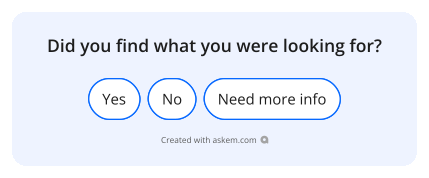
Your visitor leaves feedback on a page
The widget asks 'Did you find what you were looking for?' Visitors answer in one click: Yes, No, or Need more info.
Step 2
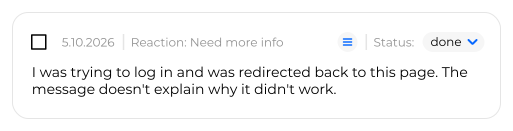
See it on your dashboard or by email
Every reaction and comment lands in your Askem dashboard, or straight in your inbox. Views, reactions and written feedback, page by page.

Step 3
Make a change based on the feedback
Read exactly what visitors couldn't find, then fix the page. Track each item from open to done.
Step 4
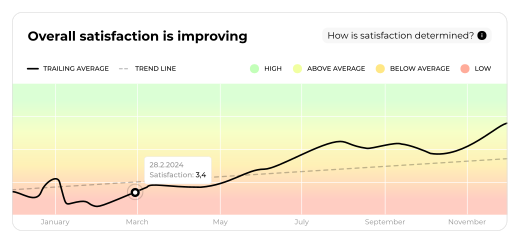
Watch satisfaction improve
Follow any page over time and see visitor satisfaction climb as you act on what they told you.
Step 5
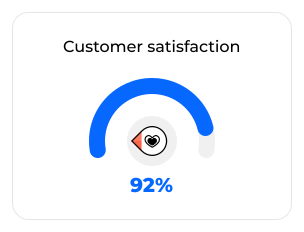
Prove the impact
Turn page-level feedback into a clear satisfaction score you can share with stakeholders.
Built for content teams who answer to real users
Accessible by design
WCAG 2.2 AA compliant buttons that work with keyboards and screen readers: feedback from everyone, not just some.
GDPR-safe and anonymous
No cookies, no IP addresses, no personal data. Hosted in the EU and never transferred outside it.
Built for thousands of pages
From a handful of service pages to a full intranet or portal, collect page-level feedback at any scale.
Feedback to action, while it still matters
Skip slow review cycles. Typical sites collect 10 to 25 reactions per 1,000 page views, so you hear about problems the day they appear, not at the annual review.
Built for accessibility, GDPR and procurement
Askem's reaction buttons meet WCAG 2.2 AA, so collecting feedback never excludes assistive-tech users, and the same accessibility work feeds your EAA accessibility statement. For public-sector sites, the EU Web Accessibility Directive requires a way for users to report problems: an accessible feedback widget covers it. Explore Askem's compliance monitoring →
Trusted across content-heavy organisations
DNA, HSY and the City of Helsinki use Askem to act on user feedback instantly, across thousands of pages.
Trusted by leading organizations
“We cut manual accessibility audits by over 80% and maintain continuous WCAG 2.1 AA compliance across all patient portals.”
Ben O'Connell
Digital Accessibility Lead
NHS Northumbria

“We use Askem every day to improve the digital customer experience. It gives us visibility we never had before and helps us react to user feedback instantly.”
Marjo-Riitta Mustonen
Lead Digital Concepts
DNA Oyj

“I recommend Askem to everyone working with websites or transactional services. It's become our go-to tool for continuous accessibility and service quality monitoring.”
Arttu Huittinen
Development Manager
HSY

“With the analytics we used before, we always had to guess what worked. Askem finally shows where users struggle and why, so we can improve content confidently.”
Hanna Loraine
Content Manager
Uniarts Helsinki

Why Askem vs a generic feedback widget
How to add a feedback widget to your website
- 1
Create your button set
In the Askem dashboard, choose the question and reaction buttons, for example 'Did you find what you were looking for?' with Yes, No and Need more info.
- 2
Copy the one-line snippet
Askem generates a single embed snippet. No development project required. It works in any CMS or intranet, including WordPress.
- 3
Paste it into your template
Add the snippet to your page or template and publish. The accessible, GDPR-safe widget starts collecting feedback immediately.
Website feedback widget FAQs
What is a website feedback widget?
How much does a website feedback widget cost?
Can I use a feedback widget on a government website?
How do I add a feedback button to my website?
Is the feedback widget GDPR compliant?
Is the feedback widget accessible?
How is this different from a survey tool?
How much feedback will we get?
Book a 20-minute demo. See the widget live on a page like yours
- No install required
- Priced for direct procurement
- GDPR and WCAG compliant